Alerts, Triage, Reporting & Escalation
One-line summary: Millions of logs become dozens of alerts. L1 sorts real threats from noise, documents the evidence, and escalates the dangerous ones to L2. Your report is the only thing that survives.
From Events to Alerts: The Funnel 🔻
EVENT  ──►  LOG  ──►  SIEM / EDR  ──►  ALERT  ──►  ANALYST
(login,     (OS,       (collects      (rule fires   (triage)
 process,   firewall,  millions/day)   on suspicious
download) cloud) event/sequence)Event happens → Logged → Shipped to SIEM/EDR → Alert fires.
- Event: something happens (user login, process launch, file download).
- Log: a system records it (OS, firewall, cloud provider).
- Alert: a notification a security tool generates when a specific event or sequence of events matches a rule.
- Why alerts exist: nobody can read millions of raw logs. Alerts shrink that to dozens per day.
### Alert Management Platforms
| Type | Examples | Role |
|---|---|---|
| SIEM | Splunk ES, Elastic | Central alert hub; the default for most SOCs |
| EDR / NDR | MS Defender, CrowdStrike | Have their own dashboards, but alerts are better forwarded to SIEM/SOAR |
| SOAR | Splunk SOAR, Cortex SOAR | Big SOCs: aggregate alerts from many tools + automate responses |
| ITSM | Jira, TheHive (even Trello) | Ticket management for alert workflow |
Remember: SIEM = see everything. EDR = see the endpoint. NDR = see the network. SOAR = orchestrate & automate. ITSM = track tickets.
Who Does What in Triage
| Role | Job in one line | Analogy 🏥 |
|---|---|---|
| L1 analyst | Review alerts, separate bad from good, escalate real threats | ER triage nurse |
| L2 analyst | Deep analysis + remediation of escalated alerts | Specialist doctor |
| SOC engineer | Make sure alerts contain enough info to triage | Builds the medical equipment |
| SOC manager | Track speed & quality so real attacks aren't missed | Hospital administrator |
| DFIR | Digital Forensics & Incident Response for major incidents | Surgery team |
L1 may get 0 to 100 alerts/day. Any one of them could be the real attack.
The Funnel in numbers
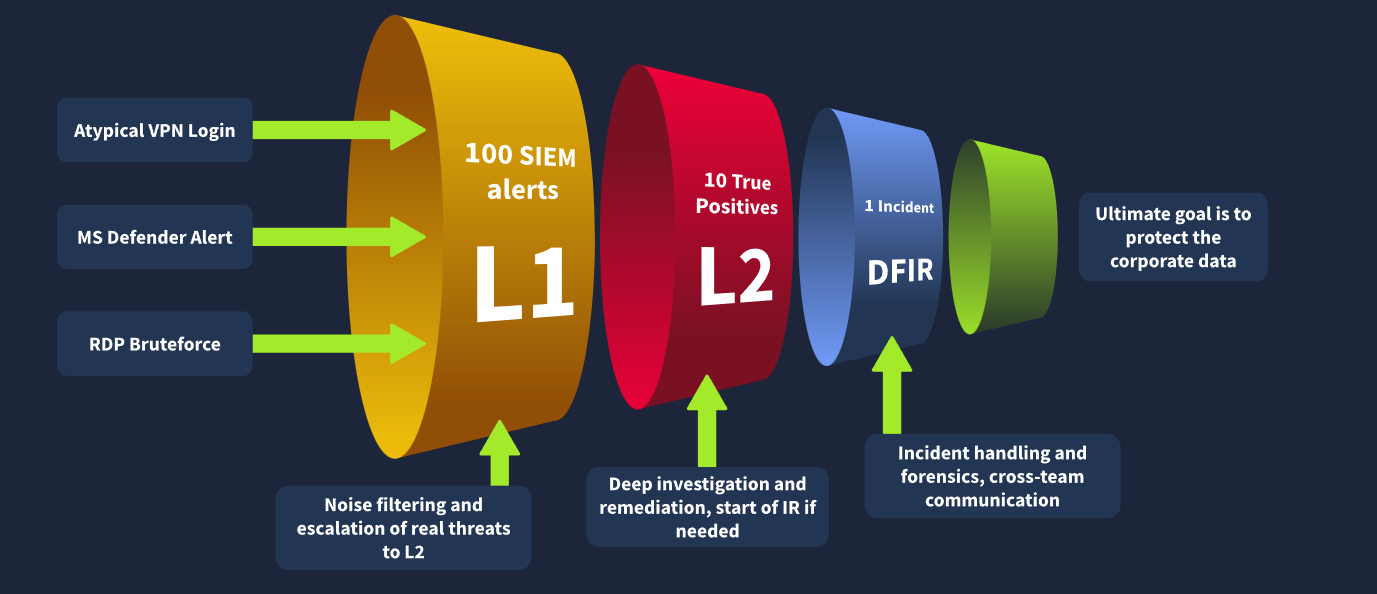
- L1: noise filtering, escalate real threats
- L2: deep investigation, remediation, starts IR if needed
- DFIR: incident handling, forensics, cross-team communication
Picking the Right Alert:
- Filter: only take new, unseen, unresolved alerts. Never grab what a teammate is already working on.
- Severity: Critical → High → Medium → Low. Detection engineers design critical rules to be more likely real and more damaging.
- Time: oldest first. If two alerts are both breaches, the older attacker is already dumping data; the newer one is still exploring.
Usually automated with sorting logic in the SIEM/EDR.
The Triage Workflow (the loop)
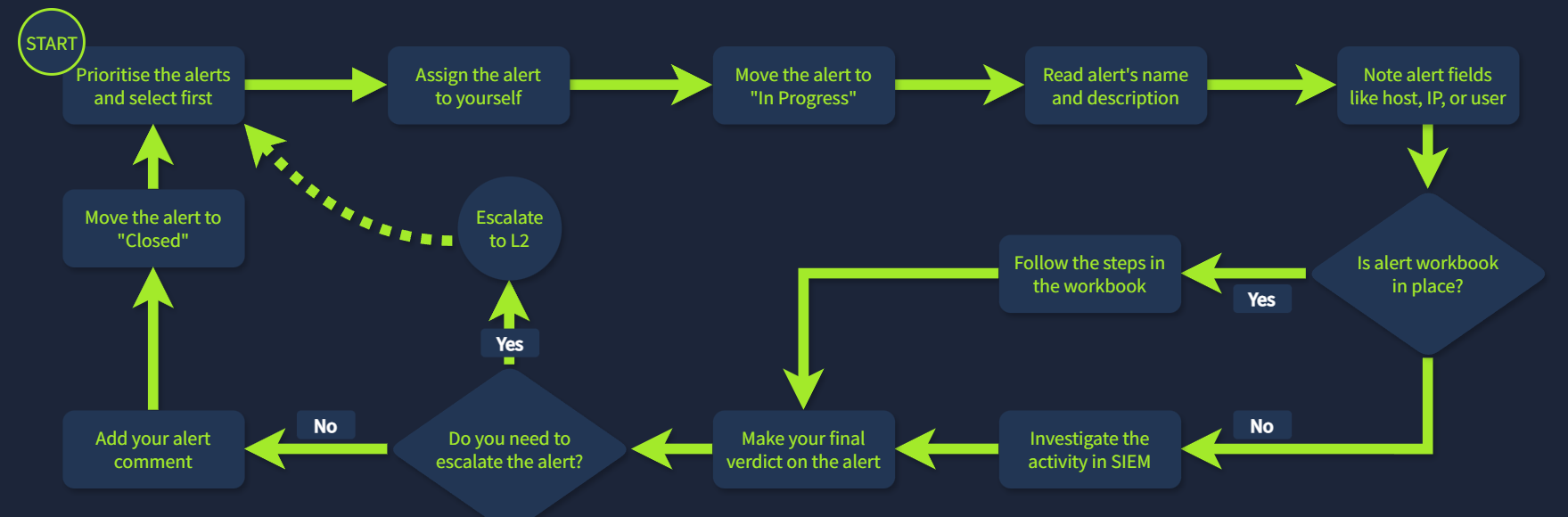
Phase 1: Initial actions (ownership)
Assign → In Progress → read the alert. This prevents two analysts colliding on one alert and makes sure you understand it before digging.
Phase 2: Investigation (the hard part)
Workbook / Playbook / Runbook = step-by-step guide for one alert category. If there's none, use "W-A-S-V":
- Who is under threat? (user, host, cloud, network, website)
- Action: what happened? (suspicious login, malware, phishing)
- Surrounding events: what happened shortly before and after?
- Verify with threat intel (e.g., VirusTotal) and other resources
Phase 3: Final actions
- True Positive (TP): malicious ✅ real threat
- False Positive (FP): looked bad, actually benign
- Write a detailed comment (steps + reasoning) → move to Closed
Alert Reporting: Why Bother Writing?
| Purpose | Why it matters |
|---|---|
| Context for escalation | L2 understands fast and doesn't start from scratch |
| Save findings for records | Raw SIEM logs are kept 3–12 months; alerts are kept indefinitely → put the evidence in the alert |
| Improve your skills | "If you can't explain it simply, you don't understand it well enough." |
The 5 Ws 🖐️
| W | Question |
|---|---|
| Who | Which user logged in / ran the command / downloaded the file? |
| What | Which exact action or sequence of events? |
| When | Exact start and end time of the activity |
| Where | Which device, IP, or website? |
| Why ⭐ | The most important one: the reasoning behind your verdict |
Report checklist
- ☑ All 5 Ws included
- ☑ Clear and precise
- ☑ Forms a single timeline
- ☑ Evidence & indicators attached
- ☑ Escalation reason explained
Model report (from the course example)
Alert: Double-Extension File Creation | Verdict: True Positive | Severity: High | Assignee: L2
At 13:56 UTC, user S.Conway (HR Coordinator) visited phishing site
freecatvideoshd[.]monsterfrom laptop LPT-HR-009. At 13:58 UTC she downloadedcats2025.mp4.exe, likely thinking it was a video. VirusTotal identifies it as LummaStealer (data theft + C2 channel). Further malware actions need deeper investigation → escalating to L2 with SIEM link.
Notice: Who ✔ What ✔ When ✔ Where ✔ Why ✔, plus a defanged URL ([.]) so nobody clicks it.
Escalation: When to Pass It to L2
Escalate if any of these:
- Major attack indicator needing deeper investigation or DFIR
- Remediation needed: malware removal, host isolation, password reset
- Communication needed with customers, partners, management, or law enforcement
- Unsure: you don't fully understand the alert
How to escalate
- Usually: reassign the alert to the L2 on shift + ping them (chat or in person).
- Some teams: formal written request with many fields.
- L2 then: reads your report → asks questions → validates TP → contacts other departments → starts Incident Response for major cases.
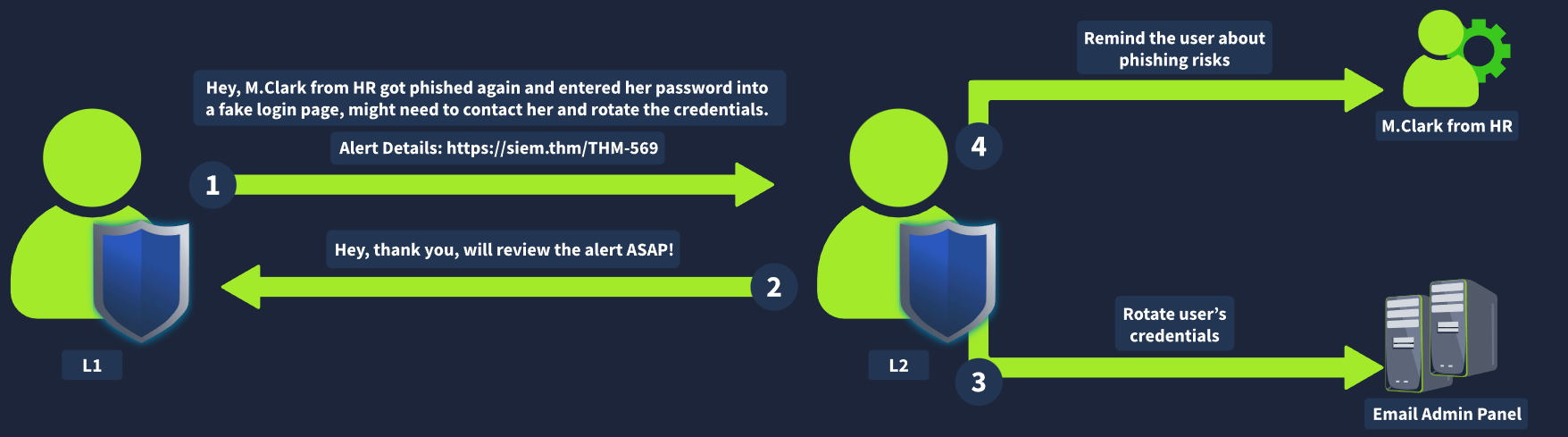 Example flow: L1 → "M.Clark from HR got phished again, entered her password on a fake page" + alert link → L2 acknowledges → L2 rotates credentials in the email admin panel + reminds the user about phishing.
Asking for help is a feature, not a weakness
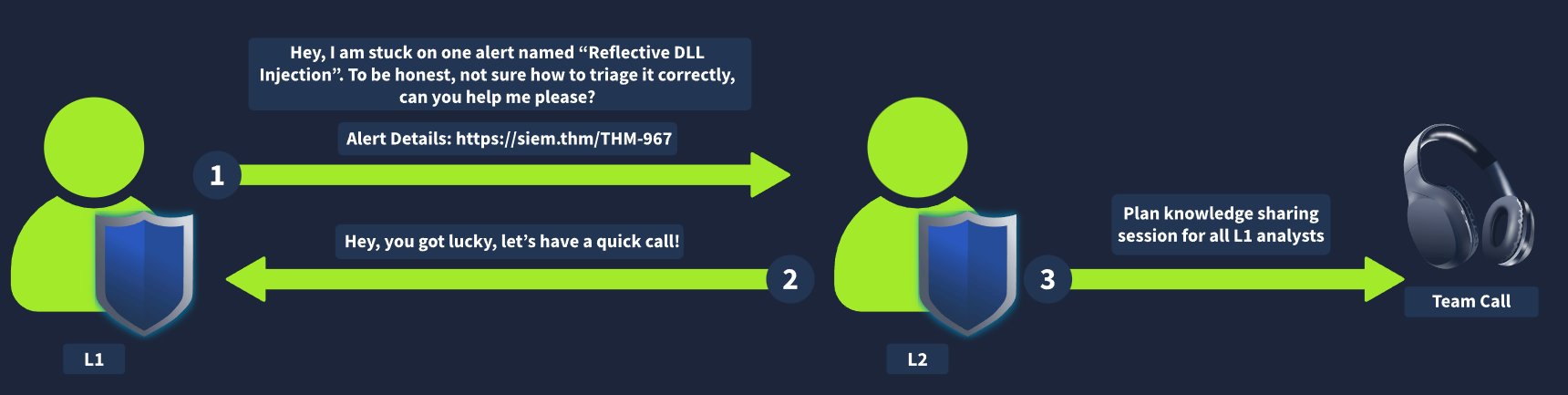 Stuck on something like "Reflective DLL Injection"? Ask L2. It's always better to ask than to blindly close an alert you don't understand. Good L2s turn it into a knowledge-sharing session for all L1s.
Communication & Crisis Cases 🚨
Best case: your SOC has Crisis Communication procedures. If not, memorize these five:
| Situation | What to do |
|---|---|
| Critical alert, L2 silent for 30 min | Know emergency contacts. Call L2 → L3 → Manager |
| Slack/Teams account compromise, need to verify with user | Never contact them on the breached channel. Use a phone call |
| Alert flood, some critical | Prioritise per workflow and inform L2 |
| Days later you realise you misclassified an alert | Tell L2 immediately. Attackers can stay silent for weeks |
| SIEM logs broken / unsearchable | Don't skip the alert. Investigate what you can, report to L2 / SOC engineer |
Golden rule: Out-of-band, up the chain, never silent.
Communication with other teams (examples)
- Ask IT: did they really grant admin rights to this user?
- Ask HR: is this newly created account a real new hire?
L2 communication (major incident example)
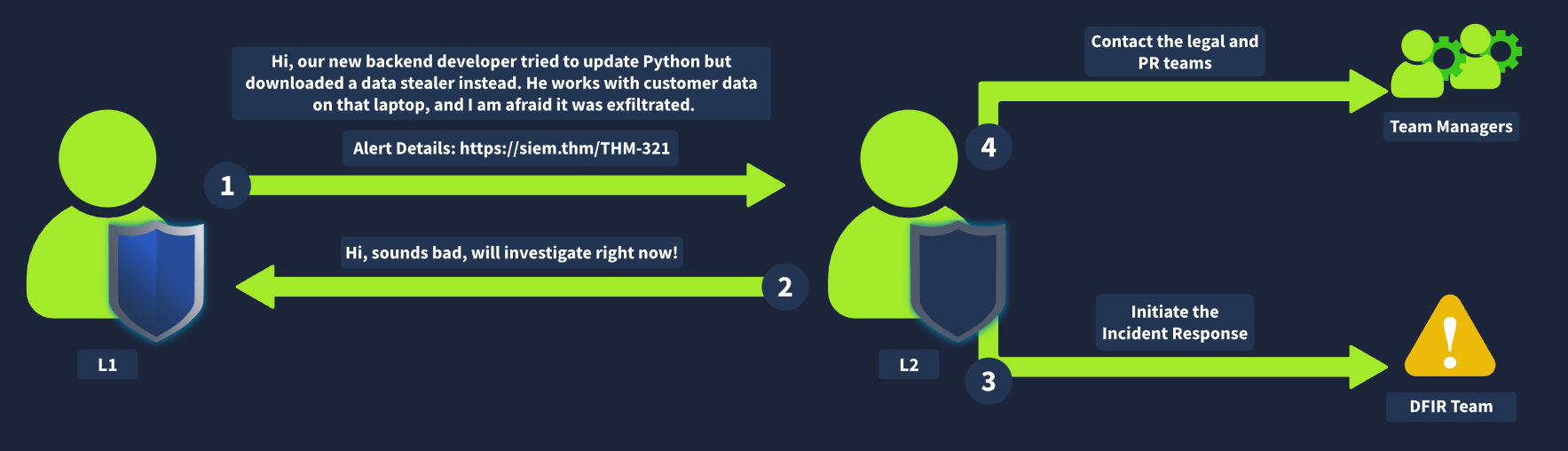
L1: "New backend dev downloaded a data stealer instead of Python; he handles customer data, may be exfiltrated" → L2 investigates → initiates Incident Response (DFIR) → contacts legal & PR via team managers.
Where the Course Oversimplifies ⚠️
- [Likely] The dangerous error is the False Negative, not the False Positive. Most alerts are FPs, so L1s develop a habit of closing quickly. That habit is exactly how real attacks get missed. Treat "close as FP" as a claim you must prove, not a default.
- [Likely] "Oldest first" can backfire. A brand-new critical alert (active ransomware) shouldn't wait behind a 6-hour-old high. Severity first, time second, and use judgment on anything showing active spread.
- [Certain] Severity is only as good as the detection rule. A mis-tuned rule labels noise "critical" and real attacks "low." Severity is a hint, not a verdict.
- [Likely] The 100 → 10 → 1 funnel is illustrative. Real true-positive rates vary wildly by SOC; many teams see far fewer than 10%.
- [Guessing] Log retention (3–12 months) varies by organization, budget, and regulation. Some keep years.
- [Certain] TP/FP is a 2×2, not a binary: also know True Negative (correctly no alert) and False Negative (attack with no alert). Interviewers ask this.
⚡ Recap
- Event → Log → SIEM/EDR → Alert: alerts cut millions of logs to dozens.
- Pick alerts with F-S-T: Filter, Severity, Time (oldest first).
- Workflow: Assign → In Progress → Investigate (workbook) → Verdict → Comment/Escalate → Closed.
- Report with the 5 Ws; Why matters most. Alerts outlive raw logs.
- Escalate: Major, Remediation, Communication, Unsure.
- Crisis: out-of-band, up the chain, never silent.
Context Is Everything (Inventories, Network Diagrams, Workbooks)
One-line summary: An alert without context is a guess. Before giving a verdict, answer who (identity inventory), what machine (asset inventory), which path (network diagram), and how to check (workbook).
The Context Toolkit:
| Letter | Tool | Answers | Analogy 🕵️ |
|---|---|---|---|
| I | Identity inventory | WHO is this user/account? | The company phone book |
| A | Asset inventory | WHAT is this machine? | The building's room register |
| N | Network diagram | WHERE did traffic come from and go? | The map of roads and gates |
| W | Workbook | HOW do I investigate this alert type? | The detective's procedure manual |
Without these, you're wandering blind through logs. With them, an alert becomes a story.
Why Context Matters: The Night-Shift Scenario 🌙
Alert: G.Baker logged into HQ-FINFS-02, downloaded Financial Report US 2024.xlsx, and shared it with R.Lund.
Questions you must answer before a verdict:
- Who is G.Baker? Role? Working hours?
- What is HQ-FINFS-02? Where is it? Who can access it?
- Why would R.Lund need corporate financial records?
Answered with inventories:
| Fact | Source | Meaning |
|---|---|---|
| G.Baker = Chief Financial Officer, UK, access VPN/HQ/FINANCE | Identity inventory | Has every reason to touch financial files |
| R.Lund = US Financial Adviser, Texas, access VPN/FINANCE | Identity inventory | A US financial report going to the US adviser fits |
| HQ-FINFS-02 = file server for financial records, UK Datacenter | Asset inventory | The right server for that file |
Likely verdict: expected business activity → False Positive, unless the login time, source IP, or location is odd (a UK CFO at 3 a.m. UK time from an unknown country is a very different story).
Lesson: the same log line is innocent or catastrophic depending on context.
Identity Inventory (the "WHO")
Definition: a catalogue of user accounts (employees) and machine/service accounts, with privileges, contacts, roles, location, and access.
Example identities
| Name | Role | Location | Access | Note |
|---|---|---|---|---|
| G.Baker | CFO | UK | VPN, HQ, FINANCE | Executive = high-value phishing target |
| R.Lund | US Financial Adviser | US, Texas | VPN, FINANCE | No HQ access |
| K.Danner | CTO | UK | VPN, DA, HQ, AWS | DA = Domain Admin → crown-jewel account |
| svc-veeam-06 | Backup service account | N/A | VEEAM, DMZ, HQ | Service accounts should never log in interactively |
| svc-nginx-pp | Web app service account | N/A | DMZ | Should stay inside the DMZ |
Two kinds of identity:
- 👤 Human accounts: have working hours, locations, managers.
- ⚙️ Service accounts (
svc-): have predictable behavior. A service account doing something new (interactive login, browsing, runningwhoami) is a red flag.
Sources of identities
| Source | Examples | Strength |
|---|---|---|
| Active Directory | On-prem AD, Entra ID | The classic identity database used by SOCs |
| SSO providers | Okta, Google Workspace | Cloud alternative to AD; easy to search users |
| HR systems | BambooHR, SAP, HiBob | Employees only, but the richest personal data (role, manager, start date) |
| Custom | CSV / Excel sheets | Common; maintained by IT or security teams |
3. Asset Inventory (the "WHAT")
Definition: a list of all computing resources (also called asset lookup). This module focuses on servers and workstations.
Example assets
| Hostname | Location | IP | OS | Owner | Purpose |
|---|---|---|---|---|---|
| HQ-FINFS-02 | UK Datacenter | 172.16.15.89 | Win Server 2022 | Central IT | Financial records file server |
| HQ-ADDC-01 | UK Datacenter | 172.16.15.10 | Win Server 2019 | Central IT | Primary domain controller 👑 |
| PC-891D | London Office | 192.168.5.13 | Win 11 Pro | Tech Support | Shared PC for accountants |
| L007694 | Remote | N/A | macOS 13 | A.Kelly, DevOps | Corporate laptop |
| L005325 | Remote | N/A | macOS 13 | J.Eldridge, HR | Corporate laptop |
Read hostnames like a code: HQ-FINFS-02 = HQ location, FINance File Server, number 02. HQ-ADDC-01 = AD Domain Controller. Naming conventions are free context.
Sources of assets
| Source | Examples | Strength |
|---|---|---|
| Active Directory | On-prem AD, Entra ID | Identity and asset database |
| SIEM / EDR | Elastic, CrowdStrike | Agents report info about monitored hosts |
| MDM | MS Intune, Jamf | Purpose-built to list and manage devices |
| Custom | CSV / Excel | Same as identities: very common |
Network Diagrams (the "WHERE")
Definition: a visual map of locations, subnets, and how they connect. Turns meaningless IPs into a story.
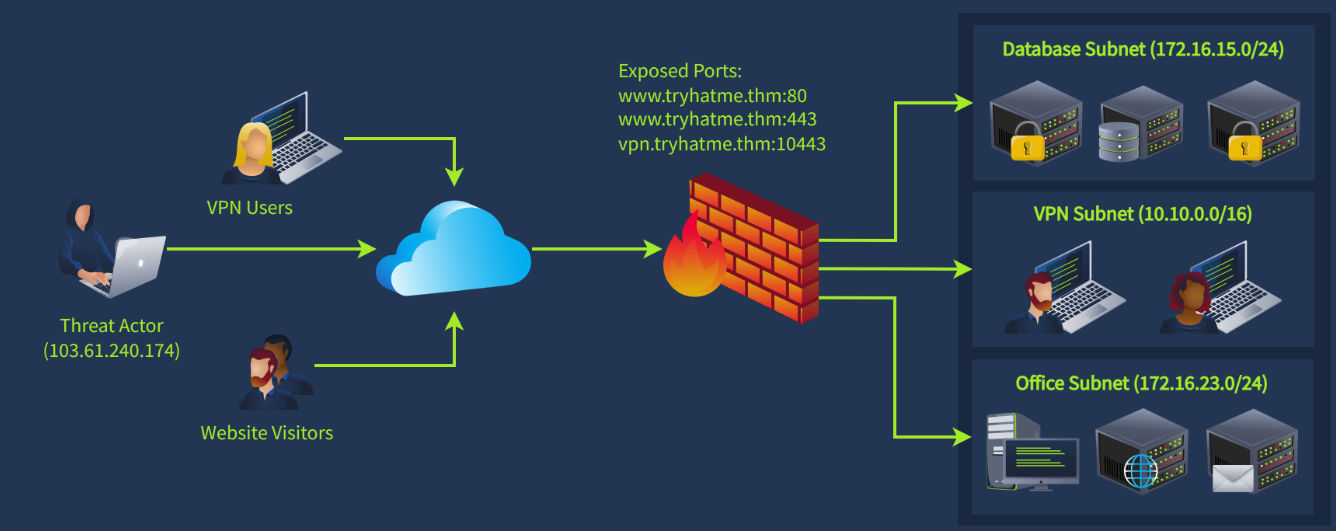
Firewall alert timeline
| Time | Raw event | What it means (with the diagram) |
|---|---|---|
| 08:00 | 103.61.240.174 hits firewall on TCP/10443 repeatedly | VPN brute force on vpn.tryhatme.thm |
| 08:23 | IP translated to internal 10.10.0.53 | Brute force succeeded; attacker got a VPN subnet IP |
| 08:25 | 10.10.0.53 scans 172.16.15.0/24, no open ports | Tried the Database subnet; blocked by firewall rules |
| 08:32 | Same IP scans 172.16.23.0/24, ongoing | Pivots to the Office subnet hunting new targets |
Memory hook:
- Knock = brute force the VPN
- Enter = valid VPN login → internal IP
- Look = scan the database subnet (blocked)
- Wander = move on to the office subnet
Key skill: the external IP (103.61.240.174) and the internal IP (10.10.0.53) are the same attacker. Linking them is what the diagram makes possible.
SOC Workbooks (the "HOW")
Workbook = playbook = runbook = workflow: a structured document defining the steps to investigate and remediate a specific threat type, consistently.
Why they exist: L1s are juniors and can't be expected to know every attack. Seniors write workbooks so L1s don't skip steps or give verdicts without evidence. L1s are often required to follow them exactly.
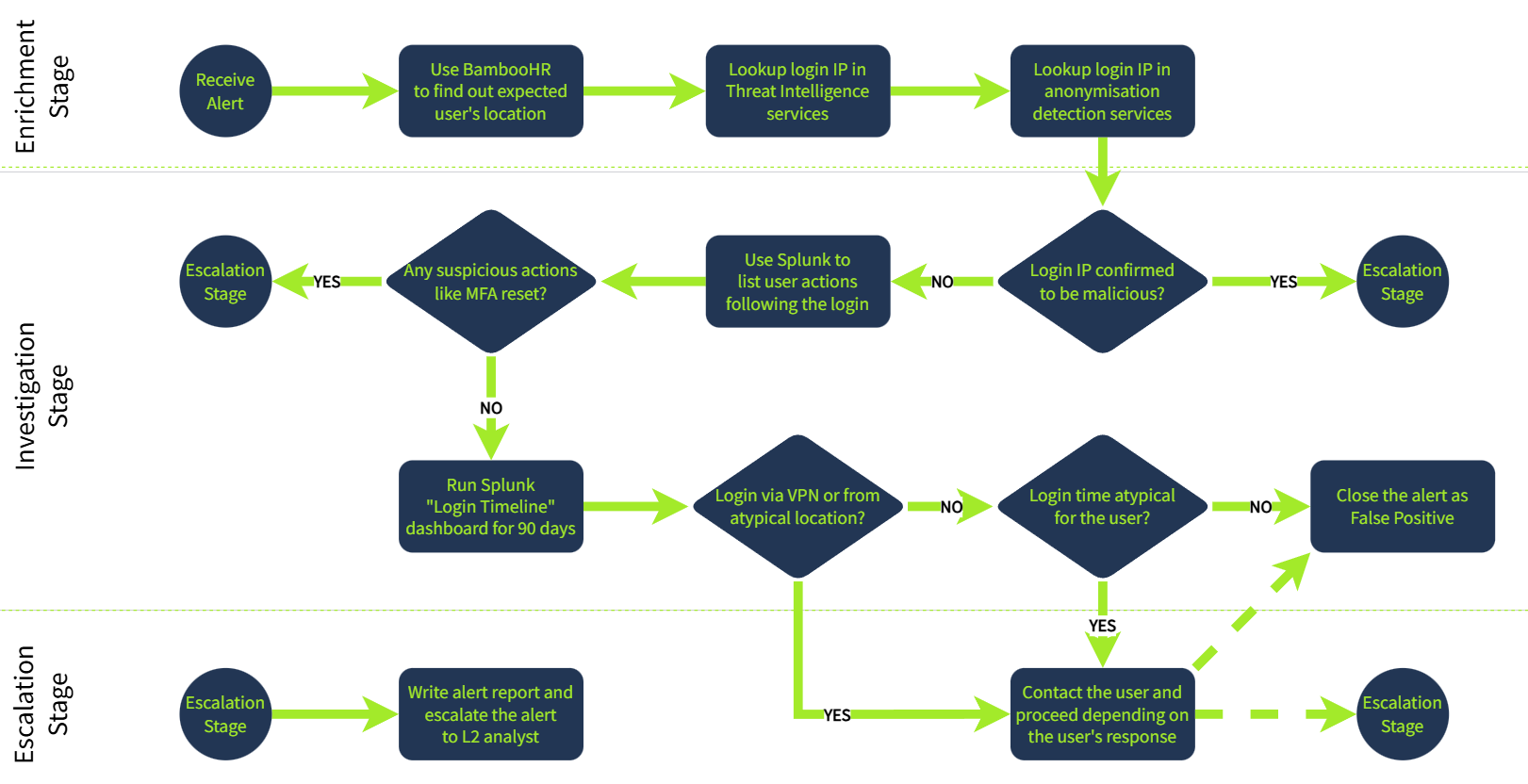
The 3 stages: → "Enrich, Investigate, Escalate"
| Stage | Purpose |
|---|---|
| 1. Enrichment | Gather context: threat intel + identity inventory |
| 2. Investigation | Use the context + SIEM logs to decide if activity is expected |
| 3. Escalation | Escalate to L2 or confirm with the user if needed |
Example: "Unusual Login Location" workbook
Enrichment
- Receive alert
- BambooHR → where is this user expected to be?
- Check login IP in threat intel services
- Check login IP in anonymisation detection (VPN/Tor/proxy) services
Investigation
Login IP malicious? ──YES──► ESCALATE
        │ NO
        ▼
Splunk: list user actions after login
        │
Suspicious actions (e.g., MFA reset)? ──YES──► ESCALATE
        │ NO
        ▼
Splunk "Login Timeline" dashboard (90 days)
        │
Login via VPN / atypical location? ──YES──► Contact user ──► FP or ESCALATE
        │ NO
        ▼
Login time atypical? ──YES──► Contact user ──► FP or ESCALATE
        │ NO
        ▼
Close as FALSE POSITIVE
Escalation: write the alert report → escalate to L2.
Pattern to remember: every "YES" leads toward escalation; only a chain of "NO"s earns a False Positive. You must prove innocence step by step.
Where the Course Oversimplifies ⚠️
- [Certain] Inventories go stale, and stale context is worse than none. A user who changed roles last month or a server repurposed without updating the sheet will make you confidently wrong. Always note which source you used and how fresh it is.
- [Likely] The scenarios connect, and the course doesn't point it out. The asset inventory puts HQ-FINFS-02 (172.16.15.89) and the domain controller (172.16.15.10) inside 172.16.15.0/24, the subnet the VPN attacker scanned at 08:25. The diagram calls it the "Database subnet." Either the documentation disagrees with itself (a real-world problem you'll hit constantly) or the attacker was probing the crown jewels. Either way, that's escalation-worthy.
- [Likely] A successful VPN brute force means a missing control. Brute force shouldn't succeed if there's MFA and account lockout. The real remediation isn't just "block the IP"; it's "why could one password open the VPN?"
- [Likely] "Contact the user" needs a safe channel. If the account might be compromised, messaging it on that account's email or chat tells the attacker. Use a phone call or the manager (same rule as internals.md).
- [Likely] Workbooks are a floor, not a ceiling. The example workbook closes as FP if the login is from a normal location at a normal time. An attacker with stolen credentials using a residential proxy in the user's own country passes every check. If something still feels wrong, escalate.
- [Guessing] The G.Baker case may hinge on time zones. A "night shift" alert might be daytime for the UK user or the US recipient. Always convert to the user's local time before calling it atypical.
⚡ Recap
- Identity (who), Asset (what machine), Network diagram (where), Workbook (how).
- Identity sources: AD/Entra, SSO (Okta), HR (BambooHR), CSV. Asset sources: AD, SIEM/EDR, MDM (Intune/Jamf), CSV.
- Service accounts (
svc-) behaving like humans = red flag. DA access = crown jewel. - Network diagram turns IPs into an attack path: Knock → Enter → Look → Wander.
- Workbooks: Enrich → Investigate → Escalate. Any YES pushes toward escalation; only all-NO means False Positive.
Metrics & SLAs (How a SOC Is Measured)
One-line summary: A SOC exists to protect the CIA (Confidentiality, Integrity, Availability) of digital assets. Metrics answer two questions: "Are we good?" (quality metrics) and "Are we fast?" (time metrics, written into the SLA).
The Big Picture
QUALITY: "Are we good?"                 SPEED: "Are we fast?"
──────────────────────────              ──────────────────────────
AC   Alerts Count                       MTTD  Mean Time to Detect
FPR  False Positive Rate                MTTA  Mean Time to Acknowledge
AER  Alert Escalation Rate              MTTR  Mean Time to Respond
TDR  Threat Detection Rate
Mnemonic for the 4 quality metrics: "How much? How noisy? How independent? How reliable?" → AC (load) · FPR (noise) · AER (L1 experience) · TDR (SOC reliability)
Mnemonic for the 3 time metrics: → Detect → Acknowledge → Respond
Quality Metrics
| Metric | Formula | Measures | Target |
|---|---|---|---|
| AC Alerts Count | Total alerts received | Analyst workload | 5–30 alerts/day per L1 |
| FPR False Positive Rate | FP ÷ Total alerts | Noise level | 0% impossible; ≥ 80% = serious problem |
| AER Alert Escalation Rate | Escalated ÷ Total alerts | L1 experience/independence | < 50%, better < 20% |
| TDR Threat Detection Rate | Detected threats ÷ Total threats | SOC reliability | Always 100% |
AC: Alerts Count
- Too many (80 unresolved at shift start) → overwhelmed analysts miss real threats hidden in spam.
- Too few (a whole week with zero alerts) → not good news. It may mean a broken SIEM or missing visibility → undetected breaches.
- Just right: 5–30 per L1 analyst per day.
Silence is not safety. Zero alerts is a symptom to investigate.
FPR: False Positive Rate
- Example: 75 of 80 alerts are FPs → 94% → bad.
- High noise → analysts lose vigilance → real attacks get treated as "yet another spam."
- Fix = "False Positive Remediation": tune tools and detection rules.
AER: Alert Escalation Rate
- L2 relies on L1 to filter noise and pass only actionable threats.
- But L1 shouldn't be overconfident about alerts they don't understand.
- High AER → L1 still leaning on seniors. Goal: < 50%, ideally < 20%.
TDR: Threat Detection Rate
Worked example (2025):
| Attack | Outcome |
|---|---|
| 1–4 | Detected & prevented ✅ |
| 5 | Missed: broken detection rule ❌ |
| 6 | Missed: L1 misclassified it as a False Positive ❌ |
TDR = 4 / 6 = 67% → very bad. Target is 100%, because one missed threat can mean ransomware or data exfiltration.
Notice attack #6: an L1 closing a real attack as FP. This is the failure from internals.md, now with a number attached.
2. Time Metrics & the SLA
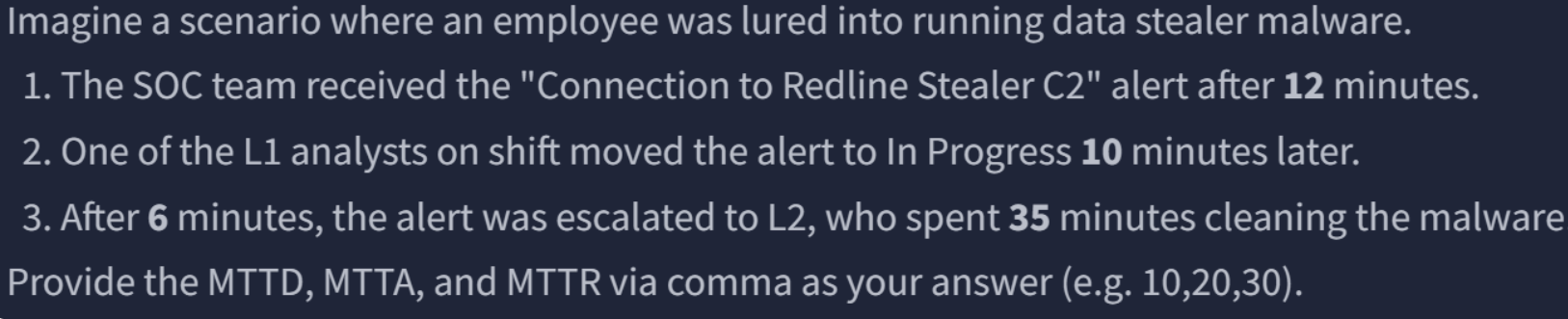
SLA (Service Level Agreement): a document signed between the internal SOC and company management, or between an MSSP (Managed Security Service Provider) and its customers. It sets the required speed of detection, acknowledgement, and response.
An alert alone stops nothing. Speed is what stops the breach.
The incident timeline
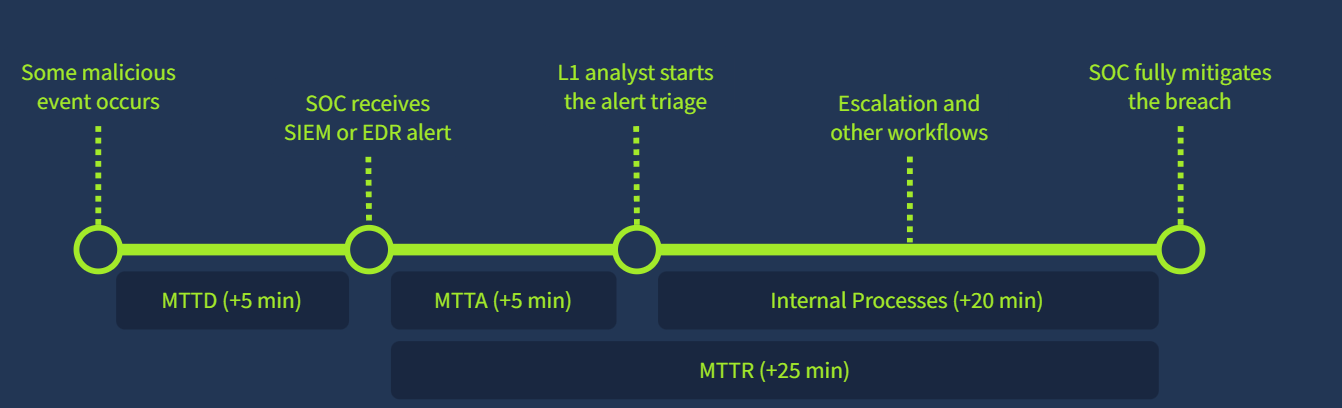
Reference table
| Metric | Common SLA | Measures | 🚨 Problem threshold |
|---|---|---|---|
| SOC availability | 24/7 (or 8/5 Mon–Fri) | Working schedule | — |
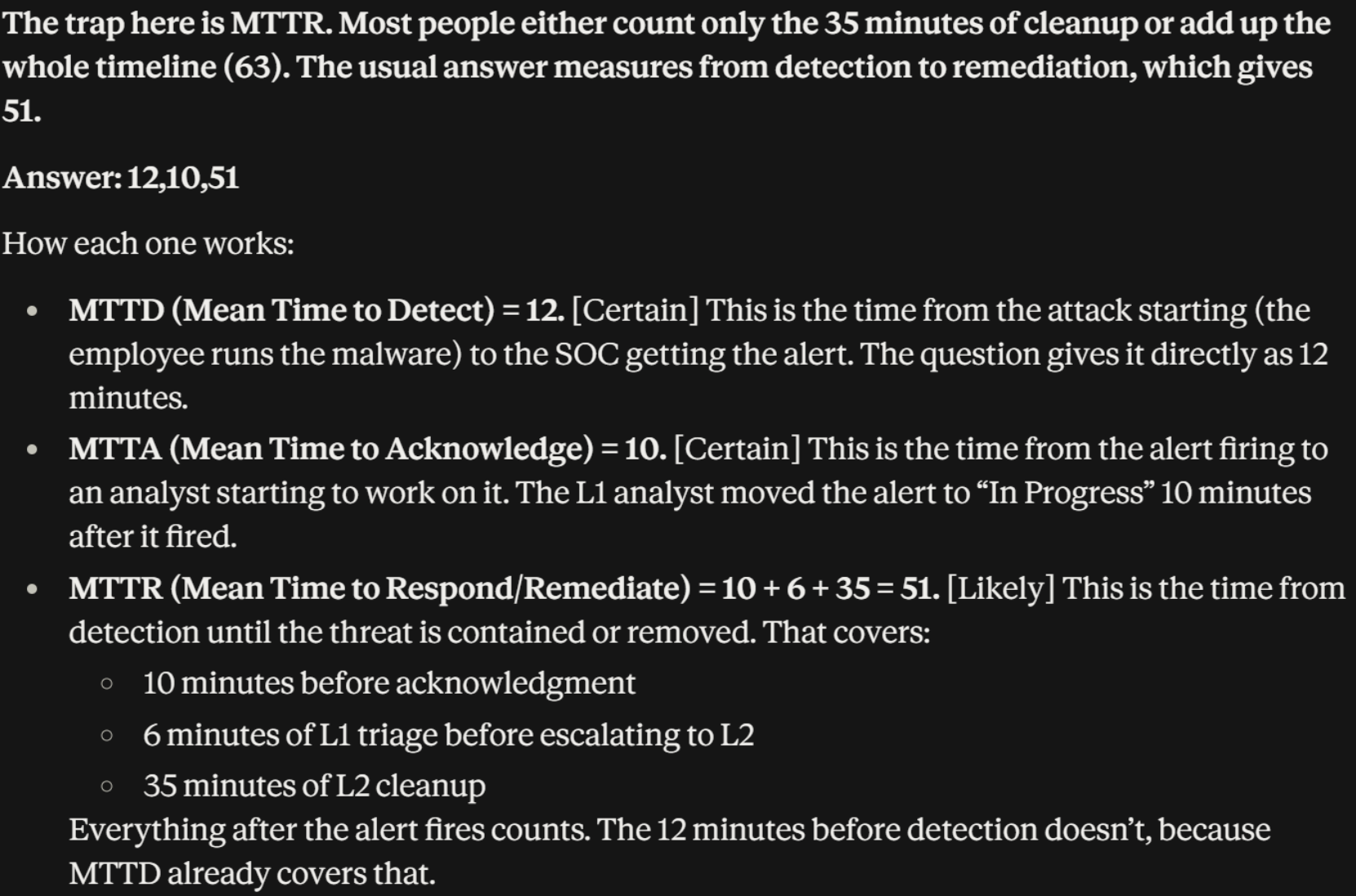
| MTTD Mean Time to Detect | 5 min | Attack → detection by SOC tools | > 30 min |
| MTTA Mean Time to Acknowledge | 10 min | Alert → L1 starts triage | > 30 min |
| MTTR Mean Time to Respond | 60 min | Time to actually stop the breach from spreading | > 4 hours |
Memory hook: "5 · 10 · 60" = the SLA ("detect in 5, touch in 10, stop in 60") Danger zone: "30 · 30 · 4h"
Who owns which metric?
| Metric | Mostly owned by |
|---|---|
| MTTD | Tools & SOC engineers (rules, log ingestion) |
| MTTA | L1 analysts (that's you) |
| MTTR | Whole SOC (L1 escalation speed + L2 + documented procedures) |
3. Diagnosing Bad Metrics (Problem → Fix)
| Symptom | Diagnosis | Fixes |
|---|---|---|
| FPR > 80% | Too much noise | 1. Exclude trusted activity (e.g., system updates) from EDR/SIEM rules · 2. Automate triage of common alerts with SOAR or scripts |
| MTTD > 30 min | Detection too slow | 1. Ask SOC engineers to make rules run faster/more often · 2. Check SIEM logs arrive in real time (no 10-minute ingestion delay) |
| MTTA > 30 min | L1 starts too late | 1. Real-time notifications for new alerts · 2. Distribute alerts evenly among analysts on shift |
| MTTR > 4 h | Can't stop breaches in time | 1. L1: escalate threats to L2 fast · 2. Document playbooks for attack scenarios |
Pattern: FPR → tune rules. MTTD → fix the pipeline. MTTA → fix notification & staffing. MTTR → fix escalation & documentation.
4. Where the Course Oversimplifies ⚠️
- [Certain] TDR's denominator is unknowable in real time. You can't count threats you never saw. TDR is only measured after the fact (from incidents, pentests, red-team exercises, breach notifications). A "100% TDR" usually means "100% of the threats we know about."
- [Likely] Every metric can be gamed, and the game hurts security (Goodhart's law). Reward low AER and L1s stop escalating uncertain alerts. Reward low MTTA and people "acknowledge" without looking. Reward low FPR and engineers delete noisy rules that occasionally catch real attacks. Read metrics together, never alone.
- [Likely] Low AER isn't automatically good. A brand-new L1 with 5% escalation is more worrying than one at 30%. It may mean they're closing alerts they don't understand, which is exactly how attack #6 in the TDR example happened.
- [Likely] "Mean" hides the worst case. An MTTR average of 45 min can include one 12-hour ransomware response. Mature SOCs also track the median and 90th/95th percentile.
- [Certain] Definitions vary between teams. The course admits this: some teams start MTTR at the attack, others at the alert. Always ask "measured from when to when?" before comparing numbers.
⚡ Recap
- SOC goal: protect CIA. L1's role: reliably report True Positives to L2.
- Quality: AC (5–30/day/L1), FPR (≥80% = problem), AER (<50%, ideally <20%), TDR (always 100%).
- Too few alerts = possible blind spot. Silence is not safety.
- Time: SLA 5 · 10 · 60 min. Danger: 30 · 30 · 4h.
- In the course's timeline, MTTR starts at the alert: 5 + 20 = 25 min; attack-to-mitigation = 30 min.
- Fixes: noise → tune/automate; slow detect → pipeline; slow ack → notify/distribute; slow response → escalate fast + document.