Phishing & Email Analysis
The Big Picture
- Spam = unwanted noise. Phishing = a weapon.
- One click by one user can be enough. It hands the attacker a foothold, and everything else starts from there.
- Defender's job: decide malicious or benign, find the true origin, and use what you learn to harden defenses.
Email Address = Postal Address
username @ domain
(mailbox) (building)- Domain → which mail server. Username → which mailbox on it.
The Protocols
| Protocol | Job | Think of it as |
|---|---|---|
| SMTP | Sends mail (client→server AND server→server) | The courier |
| POP3 | Downloads mail to one device | Taking the letter home |
| IMAP | Keeps mail on the server, synced everywhere | Reading it at the post office from any branch |
POP3 vs IMAP in one line: POP3 moves mail to a device; IMAP mirrors it across devices.
- Multiple devices (phone + laptop) → IMAP.
- ⚠️ Correction: POP3 deletes from the server only by default. Most clients have a "leave a copy on server" option.
An Email's Journey (6 steps)
- Sender's client → their mail server (SMTP)
- Sending server asks DNS: "Who handles mail for this domain?" (the MX record)
- DNS answers with the recipient's mail server
- Message travels across the Internet to that server (SMTP again)
- Recipient's client connects to their server
- Mail is downloaded (POP3) or synced (IMAP)
Sending is always SMTP. Receiving is POP3 or IMAP. DNS is the address book in between.
Attachments Live Inside the Email
Attachments are text inside the message source, not separate files. Three headers tell you everything:
| Header | Tells you | Example |
|---|---|---|
Content-Type | What the file is | application/pdf |
Content-Disposition | It's an attachment + filename | attachment; filename="invoice.pdf" |
Content-Transfer-Encoding | How it's encoded | base64 |
- To rebuild the file, decode the base64 blob with CyberChef or a base64→file converter.
- Analyst habit: compare
Content-Typewith the filename. A mismatch is a red flag.
Types of Malicious Messages
| Type | Target | Channel |
|---|---|---|
| Spam | Everyone (bulk) | |
| Malspam | Everyone, but carries malware | |
| Phishing | Anyone, by impersonating a trusted brand | |
| Spear phishing | A specific person or org, personalized | |
| Whaling | Executives (CEO, CFO) | |
| Smishing | Mobile users | SMS |
| Vishing | Anyone who answers | Voice call |
Mental model: phishing → spear (aimed) → whaling (aimed at the big fish). Smishing and vishing are the same trick through a different channel.
Anatomy of a Phishing Email — 7 Red Flags
- Fake sender
- Spoofing = forged From header that shows the real domain (
microsoft.com) - Lookalike / typosquat = a different domain that resembles the real one (
microsof.com) - ⚠️ The course calls
microsof.comspoofing. It's actually a lookalike domain. Know the difference.
- Spoofing = forged From header that shows the real domain (
- Urgency: "Account locked in 24 hours." Pressure is meant to stop you from thinking.
- Brand impersonation: copied logos, colors, layouts.
- Grammar/spelling errors: less reliable now because of AI. Clean writing does not mean safe.
- Generic greeting: "Dear Customer". The sender doesn't know your name.
- Hidden/shortened links:
bit.ly/...hides the destination, and the display text can differ from the real href. - Disguised attachments: double extensions like
invoice.pdf.exe. The last extension is the real one.
Same techniques whatever the goal: steal credentials, deliver malware, or gain access.
Safe Analysis — Defang Everything
Defanging makes an indicator unclickable so you can share it without risk.
| Original | Defanged |
|---|---|
http:// | hxxp:// or hxxp[://] |
. | [.] |
@ | [@] |
http://www.suspiciousdomain.com | hxxp[://]www[.]suspiciousdomain[.]com |
192.168.1.10 | 192[.]168[.]1[.]10 |
Rule: never click, never open. Defang it, decode it, inspect it in a sandbox.
Quick Answers
- Client → server sending protocol: SMTP
- Service that finds the recipient's mail server: DNS (MX record)
- Same mailbox on phone + laptop: IMAP
WhereGoes.com can be used to investigate shortened URLs without having to actually visit the destination.
Phishing Analysis — Artifacts & Tools
The Mindset
First, collect artifacts. Judge afterwards. Artifacts feed everything else: reputation checks → threat intel lookups → behavioral analysis.
Every artifact answers one of two questions:
- Who really sent this? (origin)
- What does it want me to do? (intent)
Header Artifacts — "Who sent it, and where do replies go?"
| Artifact | Question it answers | What to watch for |
|---|---|---|
Sender address (From) | Who claims to have sent it? | Lookalike domains; display name ≠ address |
| Sender IP | Where did it actually come from? | Reverse lookup (PTR) that doesn't match the claimed domain |
| Subject line | What pressure is applied? | Urgency, threats, "action required" |
| Recipients (To/CC/BCC) | Who was targeted? | Many hidden BCC recipients = mass campaign; one exec = whaling |
| Reply-To | Where do answers go? | Reply-To ≠ From is a classic tell |
| Date/Time | When was it sent? | Odd hours or timezone mismatches; used for building the timeline |
⚠️ What the course leaves out (you'll need these)
Fromis trivially forgeable. It's a claim, not proof.- The real path is in the
Received:headers. Read them bottom-up: the bottom one is closest to the true sender. Return-Path= where bounces go. Compare it withFrom.Authentication-Resultsholds the verdicts:- SPF: was this IP allowed to send for this domain?
- DKIM: was the message signed by the domain, and is it unaltered?
- DMARC: does the domain in
Fromalign with what passed SPF/DKIM? - Fails here are strong evidence of spoofing.
From = what the attacker says. Received + SPF/DKIM/DMARC = what the infrastructure says. Trust the infrastructure.
Body Artifacts — "What is it trying to make me do?"
| Artifact | Action |
|---|---|
| URLs / hyperlinks | Extract them all. Expand shortened links. Compare the displayed text vs the real href. |
| Attachment names | Check for double extensions (.pdf.exe), executables, macro files (.docm, .xlsm), archives |
| Attachment hash | Generate one (SHA256 preferred), then look it up in threat intel |
Why hash? A hash is the file's fingerprint. You can check whether the world already knows it's malicious without ever opening it.
sha256sum invoice.pdfTools — Who Does What
Header analysis (paste the full raw header)
| Tool | Owner | Gives you |
|---|---|---|
| Messageheader | Google Admin Toolbox | Sender IP, routing path (hops + delays), SPF/DKIM/DMARC results, misconfigurations |
| Message Header Analyzer | Microsoft | Same job, different layout |
They do the same job, so use whichever reads more clearly. Paste the entire header, not just the visible fields.
Reputation analysis
| Tool | Input | Gives you | One-liner |
|---|---|---|---|
| IPinfo | IP | Geolocation, owning org/ASN | "Who owns this IP and where is it?" |
| URLScan.io | URL | Sandboxed visit: screenshot, requests, redirects, behavior | "What happens if someone clicks?" |
| Cisco Talos (IP & Domain Reputation Center) | IP, domain, network | Reputation score + classification | "Is it already known to be bad?" |
Tool caveats
- IPinfo doesn't say "malicious". It gives context. A residential ISP IP sending "corporate" mail is suspicious; a Google IP is not proof of safety.
- URLScan.io scans are public by default. For URLs containing a victim's email, tokens or internal names, set visibility to Unlisted/Private, or you leak data to the attacker and the world.
- Clean reputation ≠ safe. New phishing infrastructure is often only hours old and has no history yet.
The Workflow in One Picture
Raw email
 ├── Header ──► Messageheader / MHA ──► sender IP ──► IPinfo + Talos
 │                                  └─► SPF/DKIM/DMARC verdict
 └── Body
      ├── URLs ──► defang ──► expand ──► URLScan.io + Talos
      └── Attachments ──► hash ──► threat intel lookup (never open)
Core Rules
- Collect first, conclude later.
- Don't trust
From. Verify throughReceivedand authentication results. - Reply-To ≠ From → be suspicious.
- Never click and never open. Scan, hash, look up.
- No bad reputation ≠ good reputation.
Body Analysis: Links, Attachments, Sandboxes
Why the Body Matters
The header tells you who sent it. The body tells you what it wants, and that's where the payload is:
- Link → lures the user to a phishing site (credential theft)
- Attachment → compromises the machine (malware)
Extracting Links — 3 Ways
| Method | How | Catches |
|---|---|---|
| Copy link address | Right-click the link → copy, don't click | Only what's visible |
| Raw source / HTML | Read the href= values in the source | Hidden or obfuscated links the rendered view hides |
| URL extraction tool / CyberChef | Paste the raw email → auto-extract every URL | Everything, fast, nothing missed |
Key idea: display text vs real destination
<a href="http://evil-login.ru/steal">https://microsoft.com/login</a>
          └── where you actually go ──┘  └──── what you see ────┘
What you see is what the attacker chose to show you. The href is the truth.
- CyberChef recipe: Extract URLs (add Defang URL afterwards for safe sharing)
- Copying a link is safe; pasting it into a browser is not. Paste it into URLScan/VirusTotal instead.
Handling Attachments
Rule: never download an attachment on your own machine. Use a lab or sandbox only, so it can't run by accident.
Step 1 — Fingerprint it
sha256sum shady_attachment.pdf
# 025ba9ce...f961f9 shady_attachment.pdf- Same file → same hash, always. Change one byte → completely different hash.
- The hash lets you ask "has anyone seen this before?" without opening the file.
Step 2 — Look the hash up
| Tool | What you get |
|---|---|
| Cisco Talos | Classification labels (e.g. Phishing, Malicious, Spam) |
| VirusTotal | Verdicts from dozens of AV vendors for files, URLs, IPs, domains |
Reading VirusTotal: a high detection count (e.g. 40/70) = known bad. 0 detections ≠ clean. It may just be new.
Step 3 — If it's unknown, detonate it in a sandbox
A malware sandbox runs the file in an isolated VM and records what it does:
- URLs/domains it contacts
- Extra payloads it downloads
- Processes, file and registry changes
- → all the IOCs you need
Sandboxes Compared
| Sandbox | Defining trait | Remember it as |
|---|---|---|
| ANY.RUN | Interactive: you click inside the VM live, watch processes and network in real time | You drive |
| Hybrid Analysis | Free, automated; behavior, network, IOCs (CrowdStrike-backed) | Upload and read the report |
| Joe Sandbox | Static + dynamic analysis, very detailed reports and classification | The deepest report |
- Static = inspect the file without running it (strings, structure, metadata)
- Dynamic = run it and watch the behavior
- Why interactive matters: some malware waits for a click, a scroll or "Enable Content". Automated sandboxes can miss that; ANY.RUN lets you trigger it.
⚠️ The course leaves this out: uploads are public
- Free tiers of VirusTotal, ANY.RUN, Hybrid Analysis and Joe Sandbox generally make submissions visible to others.
- Attackers watch VirusTotal. An upload can warn them they've been detected.
- A real corporate document (invoice, contract, HR file) uploaded = data leak.
- Search the hash first. Upload only if it's unknown and contains nothing sensitive.
PhishTool — Everything in One Place
An email analysis platform that automates the manual work from both parts of these notes.
| Tab / feature | Replaces |
|---|---|
| Authentication results | Manually reading SPF/DKIM/DMARC |
| Transmission path | Reading Received: headers bottom-up |
| URLs | Extracting links by hand |
| Attachments | Hashing and inspecting files |
| VirusTotal integration | Switching tabs to look up reputation |
Who uses it: SOC analysts (triaging user reports), threat intel analysts (collecting IOCs), researchers (investigating phishing kits).
Closing a case in PhishTool (mirrors real SOC work)
- Classify the email → Malicious
- Flag artifacts → sender address, originating IP, embedded URLs
- Add notes → what you found and why
- Click Resolve → case closed
A case without documentation was never investigated, as far as the SOC is concerned.
Full Investigation Workflow
Suspicious email
│
├── HEADER ─► Messageheader / MHA / PhishTool
│              ├─ SPF/DKIM/DMARC verdict
│              └─ origin IP ─► IPinfo + Talos
│
├── LINKS ──► extract (source / CyberChef) ─► defang
│              └─► URLScan.io + VirusTotal + Talos
│
├── ATTACHMENTS ─► (lab only) sha256sum
│              ├─► hash lookup: VirusTotal + Talos
│              └─► unknown & not sensitive? ─► sandbox
│                    (ANY.RUN / Hybrid Analysis / Joe Sandbox) ─► IOCs
│
└── DOCUMENT ─► classify ─► flag IOCs ─► notes ─► resolve
Core Rules
- The
hrefis the truth. The display text is the bait. - Attachments go to a lab only, never your own machine.
- Hash before you upload. Lookups are private; uploads are public.
- 0 detections means "unknown", not "safe".
- Static = look. Dynamic = run. Interactive = you drive.
- If it isn't documented, it wasn't investigated.
Email Authentication & Defenses — SPF, DKIM, DMARC, S/MIME
The Big Picture
Email was built with no identity checks. Anyone can write any From: address.
Each of these four was added later to fix one part of that problem:
| Standard | Question it answers | Level | Lives in |
|---|---|---|---|
| SPF | Is this server allowed to send for this domain? | Domain / server | DNS TXT record on the domain |
| DKIM | Was this message signed by the domain and left unaltered? | Domain / server | DNS TXT at selector._domainkey.domain |
| DMARC | Do SPF/DKIM results match the visible From? If not, what happens? | Domain policy | DNS TXT at _dmarc.domain |
| S/MIME | Did this person send it, and can only the recipient read it? | Person (end-to-end) | Certificates in the mail client |
SPF = the guest list. DKIM = the wax seal. DMARC = the bouncer who checks the guest list and seal against the name on the envelope, and decides what to do on a fail.
SPF — Sender Policy Framework
What it is: a DNS TXT record listing the IPs/servers allowed to send mail for a domain. How it works: the receiving server looks up the domain's SPF record and checks: is the sending IP on the list?
⚠️ What the course leaves out: which domain SPF checks
SPF checks the envelope sender (MAIL FROM / Return-Path), not the From: address you see.
An attacker can pass SPF with their own domain while showing ceo@yourbank.com in From.
SPF alone doesn't stop spoofing. That gap is why DMARC exists.
Reading an SPF record
v=spf1  ip4:127.0.0.1  include:_spf.google.com  -all
  │          │                  │                 │
version   this IP may      also trust every    everyone else:
          send             IP Google's SPF      reject
allows| Mechanism | Meaning |
|---|---|
v=spf1 | Start of the record (always first) |
ip4: / ip6: | Specific IP or range allowed |
include: | Import another domain's SPF list (e.g. Google Workspace, HubSpot) |
a / mx | The domain's own A/MX hosts are allowed |
The all qualifier decides how strict the domain is
| Ending | Name | Meaning |
|---|---|---|
-all | Hard fail | Not listed → fail / reject |
~all | Soft fail | Not listed → accept but mark suspicious |
?all | Neutral | No opinion |
+all | Pass all | Anyone may send. A misconfiguration, effectively no SPF |
TryHackMe example:
v=spf1 include:_spf.google.com include:email.chargebee.com include:7168674.spf05.hubspotemail.net ~all- No direct IPs, only 3 includes: Google (staff mail), Chargebee (billing), HubSpot (marketing).
- Real-world lesson: one company often sends through many third-party services, and each must be in SPF.
~all= soft fail for everyone else.
SPF results → intended action (per the course)
| Result | Action |
|---|---|
| Pass, Neutral, None | Accept |
| SoftFail, PermError | Flag (accept, mark suspicious) |
| Fail, TempError | Reject |
⚠️ Correction: in practice TempError (a temporary DNS problem) usually means "try again later", not a permanent discard. The receiving server decides the final action, usually together with DMARC. For quizzes, use the course table.
- PermError = the record itself is broken (bad syntax, more than 10 DNS lookups, multiple SPF records).
- None = the domain has no SPF record at all.
Tools
- dmarcian SPF Surveyor: visualizes the record and its includes, checks syntax.
- Google Messageheader: shows the SPF result for a received email.
softfail with IP Unknown!→ the sending IP isn't authorized. The email was still delivered but flagged.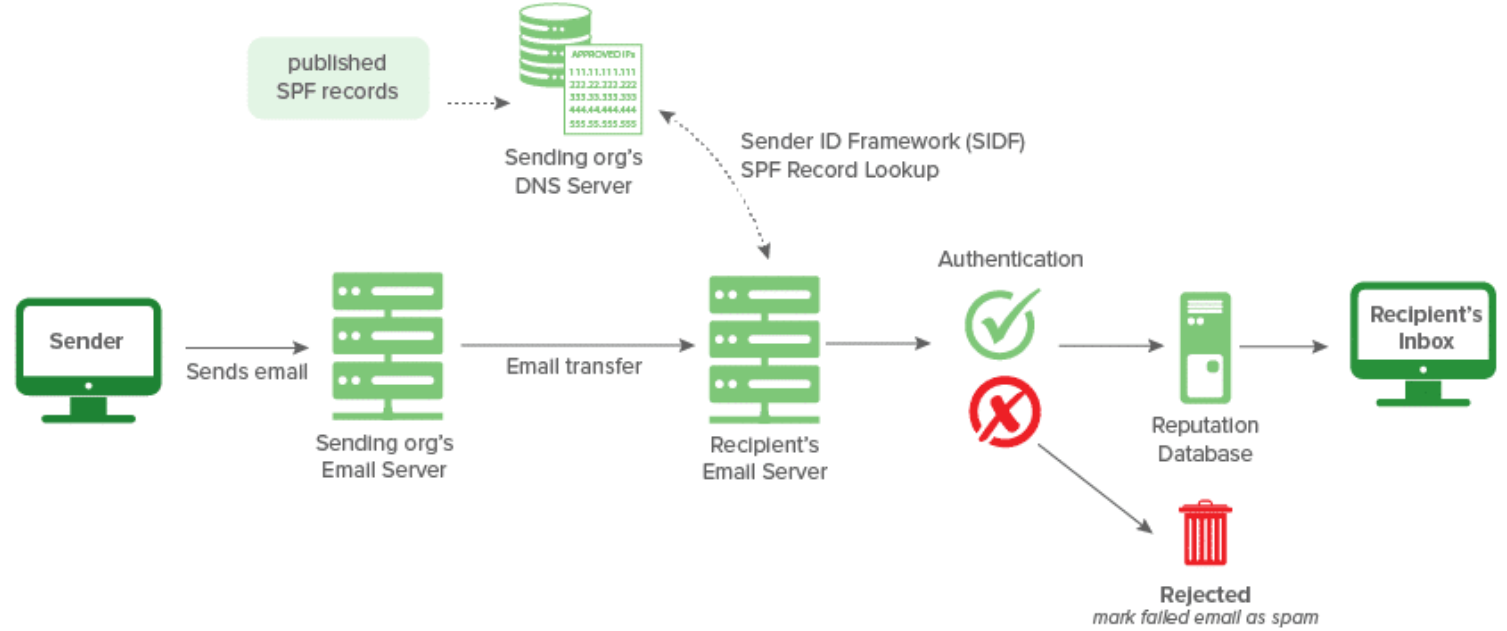
DKIM — DomainKeys Identified Mail
What it is: a digital signature added by the sending server. What it proves: the message really came from the signing domain and wasn't changed in transit.
How it works
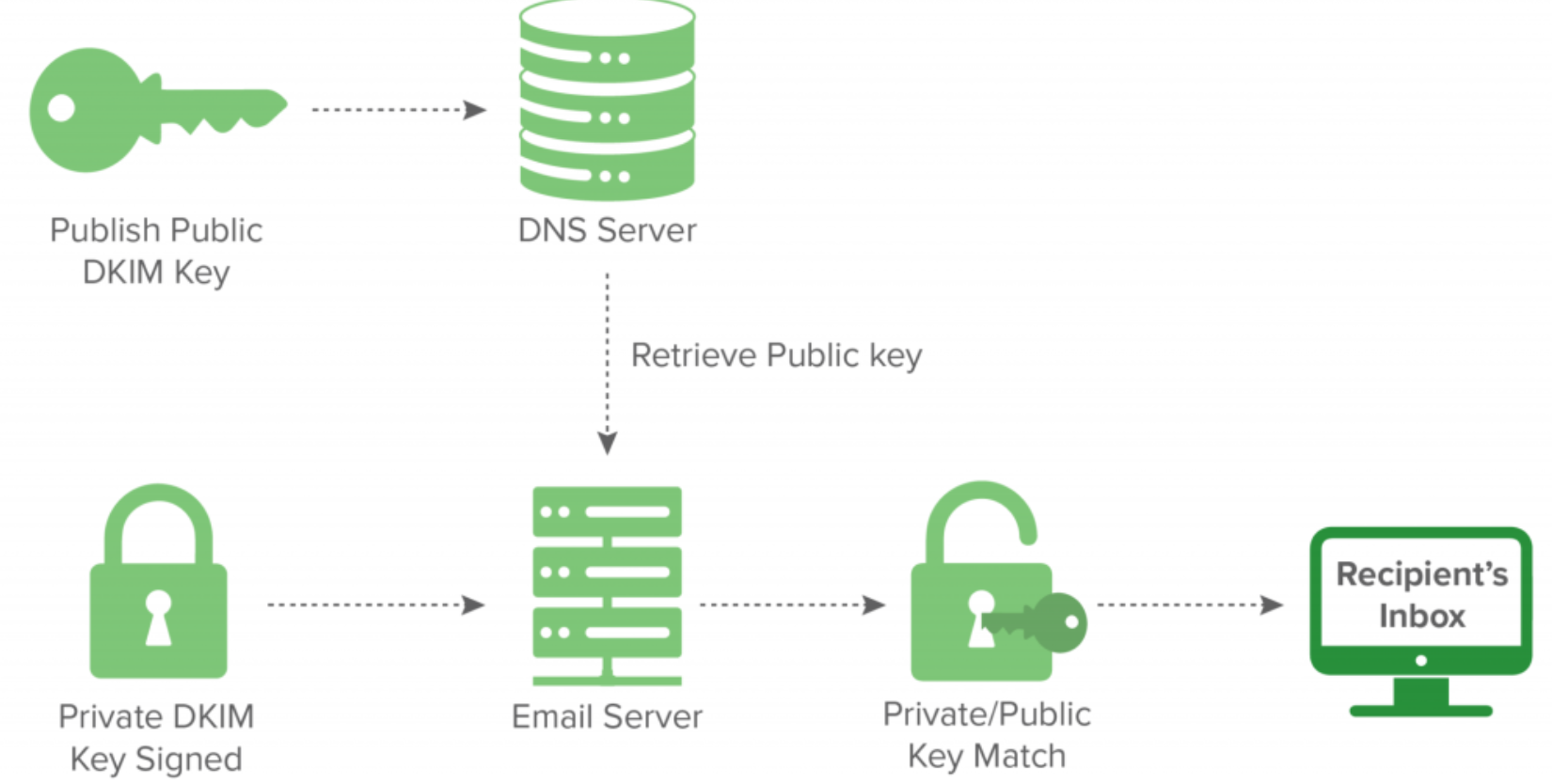
SENDER SIDE                                RECEIVER SIDE
Domain publishes PUBLIC key in DNS ───────► Receiver fetches public key
Server signs email with PRIVATE key ──────► Verifies signature with it
                                              ├─ match    → authentic ✅
└─ no match → flag / reject ❌- Private key stays on the sending server and signs.
- Public key sits in DNS and verifies.
- DKIM signs, it does not encrypt. Anyone can still read the email.
Reading a DKIM record
v=DKIM1; k=rsa; p=<public_key>| Tag | Meaning |
|---|---|
v=DKIM1 | Version (optional) |
k=rsa | Key type. RSA is standard |
p= | The public key used to verify signatures. If empty, the key is revoked |
In a received header, look for:
header.d=/header.i=→ the signing domainheader.s=→ the selector, which tells the receiver which DNS record holds the key (default._domainkey.domain)
DKIM vs SPF: why DKIM is stronger
- SPF breaks on forwarding, because the forwarder's IP isn't on the original domain's list.
- DKIM survives forwarding, because the signature travels with the message.
- Caveat: if a forwarder modifies the message (mailing lists adding footers or subject tags), the signature breaks.
dkim=permerror: a permanent verification failure
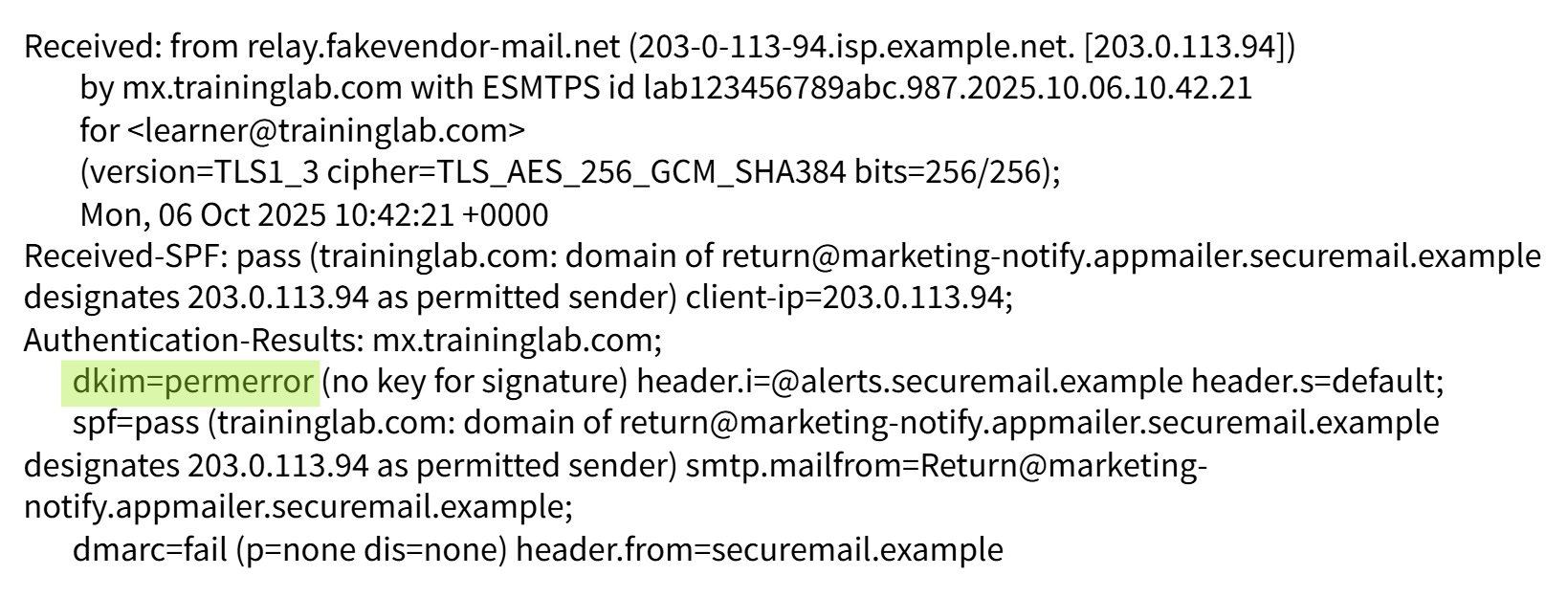 Causes:
- Invalid signature
- Missing or incorrect DNS key (
no key for signature) - A forwarding server modified the message
- DKIM misconfiguration
Tools: dmarcian DKIM Record Checker and Validator.
DMARC — Domain-based Message Authentication, Reporting & Conformance
What it is: a policy that ties SPF and DKIM to the visible From: domain through alignment, then tells receivers what to do when that check fails.
The rule
DMARC passes if SPF or DKIM passes, and the passing one aligns with the
From:domain.
Alignment = the domain that passed SPF (envelope) or DKIM (d=) must match the domain the user sees in From:.
This closes the SPF gap: passing SPF with attacker.com while showing bank.com → DMARC fails.
Reading a DMARC record
v=DMARC1; p=quarantine; rua=mailto:postmaster@website.com| Tag | Meaning |
|---|---|
v=DMARC1 | Version (required, must be first) |
p= | Policy for mail that fails |
rua= | Where to send aggregate reports (daily summaries) |
ruf= | Where to send forensic reports (per-failure detail) |
pct= | % of failing mail the policy applies to |
The three policies: escalating strictness
| Policy | What happens to failing mail | Protection |
|---|---|---|
p=none | Nothing. Delivered normally, only reported | Monitoring only, no protection |
p=quarantine | Sent to spam/junk | Medium |
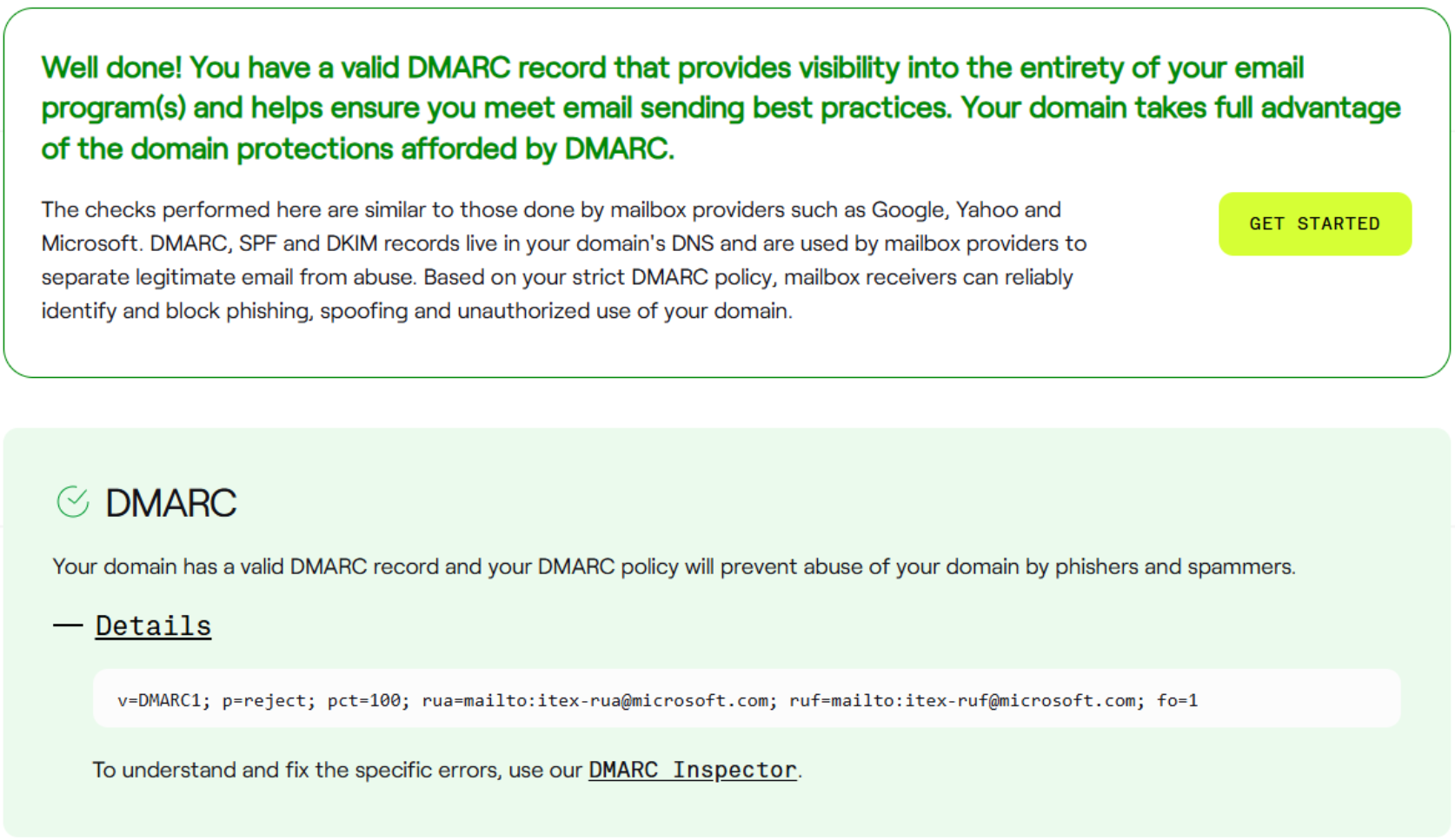
p=reject | Blocked outright | Strong (e.g. microsoft.com) |
p=noneis a common trap. A domain has DMARC but enforces nothing. Spoofed mail still gets through.
Reading the course's spam header
spf=pass        (envelope domain authorized the IP)
dkim=permerror  (no key for signature, so DKIM failed)
dmarc=fail (p=none dis=none)- DMARC failed, but the policy is
p=none, so the disposition wasnone→ delivered anyway. - Lesson: an SPF pass by itself proves little. Always read all three together, plus the policy.
Tool: dmarcian Domain Checker inspects DMARC, SPF and DKIM for any domain at once (microsoft.com passes everything with p=reject).
S/MIME — Secure/Multipurpose Internet Mail Extensions
What it is: person-to-person signing and encryption using public-key cryptography and certificates.
- Private key → never shared
- Public key → shared openly (inside a certificate)
The two features
| Feature | Key used | Provides |
|---|---|---|
| Digital signature | Sender signs with their own private key; recipient verifies with sender's public key | Authentication (who sent it), Non-repudiation (sender can't deny it), Integrity (changes are detected) |
| Encryption | Sender encrypts with recipient's public key; recipient decrypts with their own private key | Confidentiality (only the recipient can read it) |
Sign with YOUR private key. Encrypt with THEIR public key. Whatever one key locks, only its pair unlocks.
Bob → Mary walkthrough
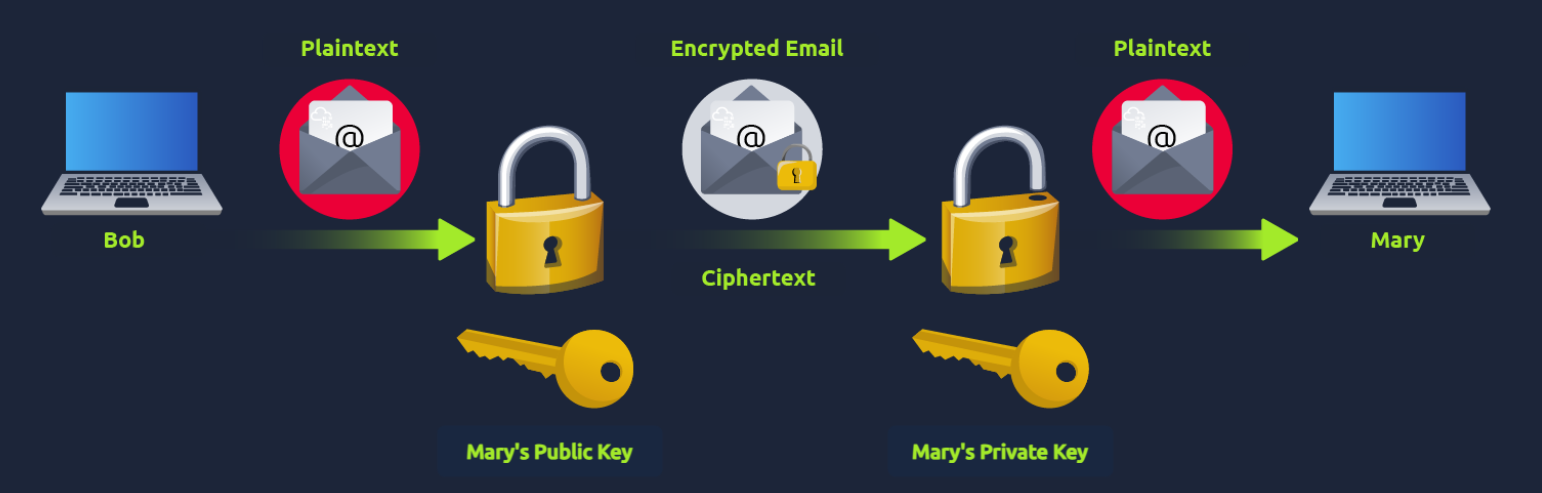
- Bob gets a certificate (holds his public key)
- Bob signs with his private key → signature
- Bob shares his public key (certificate) with Mary
- Bob gets Mary's public key and encrypts with it
- Mary verifies the signature with Bob's public key
- Mary decrypts with her private key
- To reply, Mary does the same in reverse. Now both hold each other's certificates.
⚠️ Correction: the course says Bob "creates" a certificate. In practice certificates are issued by a trusted Certificate Authority (CA). A self-made certificate proves nothing to a stranger.
DKIM vs S/MIME (easily confused, both are signatures)
| DKIM | S/MIME | |
|---|---|---|
| Who signs | The domain's mail server | The individual person |
| User sees it? | No, it's in the headers | Yes, a signed/encrypted badge |
| Encrypts? | No | Yes (optional) |
| Proves | The domain sent it, unaltered | This person sent it |
Defenses — Layered
Technical controls (stop it before the inbox)
| Control | What it does |
|---|---|
| Email filtering | Blocks or quarantines based on IP and domain reputation |
| Secure Email Gateway (SEG) | Deep inspection: catches impersonation and spoofing other filters miss |
| Link rewriting | Swaps URLs for safe redirect links, so they're checked at click time, not just delivery time |
| Sandboxing | Detonates links and attachments in an isolated VM before the user gets them |
Why link rewriting matters: attackers send a clean link that passes scanning, then make it malicious after delivery. Checking at click time catches that switch.
Human controls (for what gets through anyway)
| Control | What it does |
|---|---|
| Warning banners | "External Sender", "Suspicious Link", trusted-sender badges |
| Phishing report button | One click → straight to the SOC |
| Awareness training | Teaches users the red flags and social engineering tactics |
| Phishing simulations | Controlled fake campaigns to test and reinforce training |
Technology filters most. People catch the rest, and the report button turns users into sensors for the SOC.
Core Rules
- SPF checks the envelope, not the From. On its own it doesn't stop spoofing.
- DKIM signs; it doesn't encrypt. It survives forwarding unless the message is modified.
- DMARC = alignment + policy. It's the only one of the three that protects the visible From.
p=noneprotects nothing. Check the policy, not just whether DMARC exists.- Never judge on one result. Read SPF + DKIM + DMARC together.
- Sign with your private key; encrypt with their public key.
- Defense is layered: filter → gateway → rewrite → sandbox → banner → trained user → report.